
AI-Powered Color Correction · 1 Free HD Try
Remove Matcha Filter from Your Photos — AI-Powered, One Click
Got a photo stuck with that viral green tint? Our AI color correction strips harsh matcha casts, restores authentic skin tones, and delivers studio-grade portraits in ~15 seconds.
~15s Fast Results 100% Private (24h Auto-Purge) 1 Free Credit Included
Drag & drop your matcha-filtered photo hereor click to select from deviceSupports JPG, PNG, WEBP up to 20MB · Encrypted & deleted in 24h
Recommended: clear portrait with natural lighting
Recommended: clear portrait with natural lighting
SEE THE DIFFERENCE
Before & After AI Color Correction
Drag the slider horizontally to compare the raw matcha-filtered input with our AI-reconstructed natural portrait.
Interactive AI PreviewDrag slider to compare

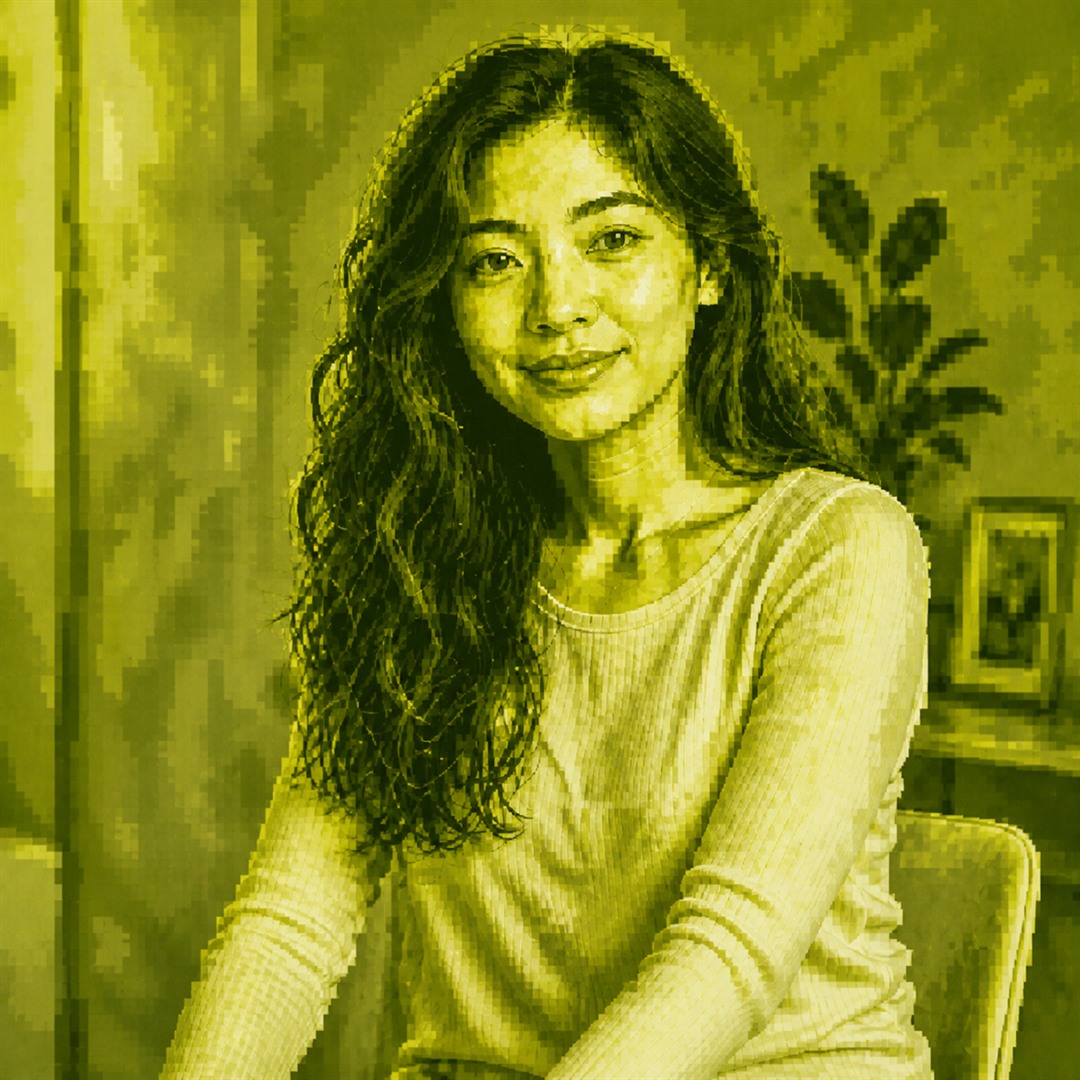
Results vary. This is a new AI-generated interpretation, not original photo restoration.
Try another example:
100% Private ProcessingEncrypted transfer and strictly private workspace.
Auto-Purge in 24hInput photos & AI outputs are permanently deleted.
Ethical GuardrailsExplicit, minor, and harmful content is strictly blocked.
Engineered for Realism — What AI Can and Cannot Do
We believe in complete transparency. Here is an honest breakdown of what our AI color correction effectively fixes and what remains beyond any tool’s capability.
What Improves with AI Color Correction
Green-Yellow Color Cast: Strips unnatural olive-lime tints to reveal authentic skin tones and natural ambient light.
Contrast & Dynamic Range: Rebalances flattened tone curves and restores photographic depth between light and shadow.
Photographic Texture: Replaces harsh posterization and digital grain with smooth, natural skin contours.
What Cannot Be Fully Recovered
Liquid Geometric Distortion: Pixels permanently warped by viral filter displacement cannot be mathematically reversed.
Destroyed Micro-Details: Micro-details completely flattened by compression are AI-inferred rather than forensically restored.
Non-Consensual / Harmful Content: Explicit, minor, or non-consensual images are strictly prohibited and automatically blocked.
Three Simple Steps to Fix Your Photo
11. Upload photoSelect any matcha-filtered JPG, PNG, or WEBP portrait.
2. Confirm & ProcessAI analyzes the scene & corrects color cast in ~15 seconds.
33. Download in HDReceive a studio-grade, natural color reconstruction instantly.
Transparent One-Time Pricing. No Subscriptions.
Try your first reconstruction free. Upgrade to Pro packs when you want 2K resolution, advanced detail preservation, and lifetime credits.
100% Fair-Credit Guarantee: If an issue occurs during generation, your credit is immediately restored. One-time charge via Stripe. Compare plans and terms.
Natural reconstruction guide
What is Matcha Filter Remover?
Matcha Filter Remover is built for images covered by the distinctive olive, lime, or yellow-green matcha effect often seen in stylized social posts. The service creates a new AI-generated interpretation from the visual evidence that remains in the uploaded picture. Read the step-by-step matcha filter removal guide to choose the right method for an editable project or an already exported photo.
Designed for a recognizable matcha effect
A strong matcha filter can flatten skin tones, replace realistic colors with green and yellow hues, exaggerate edges, and turn natural texture into a glossy or embossed pattern. It may also reduce shadow detail and make faces, clothing, furniture, signs, food packaging, or outdoor scenery difficult to read. Matcha Filter Remover gives the model the complete uploaded image and asks it to reinterpret that altered scene with believable color, light, depth, and photographic texture.
The goal is a coherent new picture that follows the visible pose, framing, subject placement, and broad composition. This makes the tool useful for exploring how a heavily stylized image could look as a natural photograph. It remains an interpretation, so it should never be treated as evidence of what the original image actually contained.
Reconstruction rather than pixel recovery
When a destructive filter overwrites color and fine detail, no website can reliably recover information that is absent from the file. Matcha Filter Remover therefore does not claim to reverse an editing operation or reconstruct the exact source photo. The AI studies shapes, contours, visible objects, lighting clues, and spatial relationships, then generates a plausible result that is inspired by those clues.
This distinction matters most around faces, hands, lettering, logos, jewelry, tattoos, fabric patterns, and small background objects. These details may be changed, simplified, or invented. Compare the downloaded reconstruction with your source image and describe the result as an AI reconstruction, not as the recovered original. The slider on this homepage demonstrates example inputs and outputs; it is not part of the uploaded-image result screen.
Input recommendations
How to get a better reconstruction result
The quality of an AI reconstruction depends on how much useful structure remains visible. A larger, clearer input gives the tool more dependable clues about the subject, environment, and intended composition.
Start with the clearest available file
Upload the original downloaded image when possible instead of a screenshot that has been resized several times. JPG, PNG, and WEBP are accepted up to 20MB. A sharp image with recognizable boundaries helps the model separate a person from a car seat, wall, table, window, landscape, or other background element. Very small thumbnails and aggressive compression can introduce blocks and ringing that the model may interpret as real texture.
Keep the subject and framing visible
Results are generally easier to interpret when the main subject is not hidden by a crop, sticker, large caption, or another person. Matcha Filter Remover can follow approximate posture and object placement, but it cannot infer an exact face or object that the filtered image never shows. If several versions are available, choose the one with the most complete scene and the least motion blur.
Review details before using the output
Inspect eyes, fingers, teeth, text, logos, repeated patterns, reflections, and boundaries between objects. These are common areas where generative models can make mistakes. If an important detail is inaccurate, try a clearer input or create another variation. Do not present a Matcha Filter Remover output as verified identity, documentary evidence, or an exact restoration.
Privacy, safety, and consent
Responsible use of AI reconstruction
The workflow is designed around temporary processing, clear limitations, user consent, and output safety checks. You must be at least 18 and own the upload or have permission to process it.
Temporary image processing
Uploads and generated images are stored only as needed to run the service, show an authenticated result, and support user-requested deletion. Both are scheduled for automatic deletion within 24 hours, and you should download anything you want to keep before it expires. Limited job records may remain for credit accuracy, reliability, abuse prevention, and service operations, as explained in the Privacy Policy.
Google sign-in connects reconstruction history and credits to an account. Google handles the sign-in screen; the website does not see your Google password. For account access, correction, deletion, privacy questions, or technical support, contact support@matchafilterremover.online.
Clear limits on acceptable use
Matcha Filter Remover is not a clothing-removal, see-through, private-content reveal, identity-verification, or forensic recovery service. Explicit content, material involving minors, non-consensual imagery, illegal exploitation, harassment, fraud, and attempts to bypass safety controls are prohibited. Generated output is checked before it is retained and displayed, and a request may be blocked when the result violates the safety policy.
Only upload images you are legally authorized to use. Respect copyright, privacy, publicity, and consent rights, and disclose that an output was generated by AI whenever the context could otherwise mislead someone. Review the Acceptable Use Policy and Terms of Service for the full rules.
Matcha Filter Remover frequently asked questions
Matcha Filter Remover is an AI image reconstruction tool for pictures affected by a strong olive-green, yellow-green, embossed, or posterized matcha-style effect. It creates a new natural-looking interpretation of the visible subject and scene. It does not retrieve an original file or restore pixels that are no longer present.
If you still have the original editing project, disable the effect in the app that applied it and export the photo again. If you only have an already exported matcha-filtered photo, upload it here to create a new natural-looking AI reconstruction. The generated result is an interpretation, not the recovered original.
If the effect is still editable in TikTok, CapCut, or another editor, reopen that project and turn off the active effect before exporting again. If you only have a saved image or screenshot, the original pixels are no longer available; Matcha Filter Remover can create a new AI reconstruction from the visible image instead.
No. The current service accepts still JPG, PNG, and WEBP images only. It does not accept or process video files, and it should not be described as a video filter remover.
The original pixels are gone, and a matcha effect can replace color, texture, lighting, facial detail, text, and background information. Because those source pixels are unavailable, AI must interpret the visible composition. Faces, hands, clothing, packaging, lettering, shadows, and small objects may therefore change.
No. This reconstruction service cannot reveal hidden private content, see through clothing, or recover an original photo. Explicit, minor, non-consensual, illegal, and abusive uses are prohibited. Generated results also pass an output safety check before they can be displayed.
Use a clear JPG, PNG, or WEBP image with one easy-to-see subject, recognizable edges, a stable composition, and enough resolution to understand the scene. Severe blur, tiny inputs, heavy compression, blocked faces, and unreadable details give the reconstruction less reliable visual evidence.
Your upload and generated result are stored temporarily for the reconstruction workflow and scheduled for deletion within 24 hours. Download any result you want to keep before it expires. We do not sell uploaded images or use them for advertising.
No. The reconstruction aims to keep approximate pose, framing, subject placement, and scene structure, but exact identity is not guaranteed. Logos, labels, signs, tattoos, jewelry, fingers, and other fine details may be altered or invented by the model.
Processing time depends on image size, provider demand, and safety checks. The interface shows the current job state, and signed-in users can revisit History if a request takes longer than expected. A displayed time is an estimate rather than a delivery guarantee.
Yes. Starter, Creator, and Power are one-time Pro credit packs available through secure Stripe-hosted Checkout. The free first reconstruction uses the Standard model; accounts with a completed live purchase use the higher-fidelity Pro reconstruction model for future jobs. The selected USD amount is charged once, credits are added after server-side payment confirmation, and there is no subscription. Purchased credits do not expire and remain in your account until used. Credit-pack purchases are final after delivery, subject to verified billing errors and rights required by law.
Google shares the account identifier, name, email address, email-verification status, and profile image you authorize. The website never receives your Google password. You can review the Privacy Policy before continuing.
Email support@matchafilterremover.online for account, privacy, safety, or technical questions. Do not send passwords, OAuth authorization codes, one-time passwords, recovery codes, payment details, or unlawful image content by email.